

Each year, per Board of Regents Policy 11-E, the University of Colorado asks employees to verify the accuracy of their sick and vacation leave in the employee portal.
GET STARTED
Download this step-by-step guide on certifying leave. The first page guides you through directions to certify your leave in the portal.
TROUBLESHOOTING TIPS
If you believe the leave tallies look off, there have some tips to help you troubleshoot. To check the Leave Certification balance against figures in My Leave:
- Set your My Leave calendar to July 2018.
- Review figures in the Usable Balance column, includes the time taken in June along with the accrual from June.
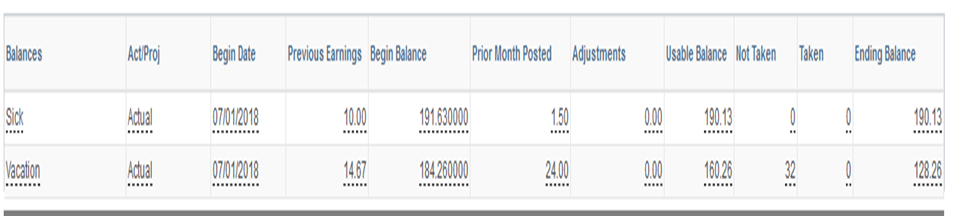
- Compare My Leave’s Usable Balance figures with the Annual Leave Certification’s Ending Balance column. If these figures match, you can certify your leave.
ANNUAL LEAVE CERTIFICATION (click to enlarge)

MY LEAVE BALANCE (click to enlarge)
If balances do not match or there are additional questions before certifying your leave, please contact your department’s payroll liaison for assistance.
Leave a Reply